Leksi, a word game with a twist
Feb 28, 2026
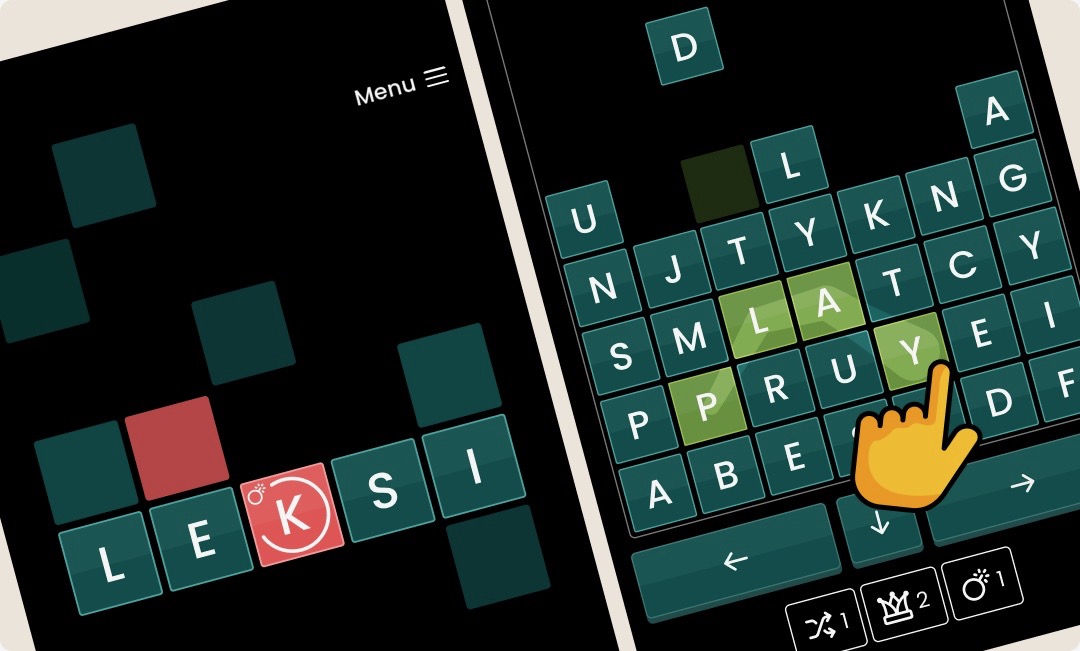
My wife and I have launched our little side project, Leksi. It's a word game with a twist: blocks fall from the top of the screen, so you need to pay attention to where they land while also forming words by dragging across the letters.
Try it out, why don't you? It's out for iOS now.
52 things of 2025
Dec 27, 2025
This annual 52 things I learned list from synth maker Tom Whitwell has become something I look forward to as the end of the year approaches. Indeed, I have linked to it twice before.
This year's list is great too. My favourite is perhaps:
Marchetti’s Constant is the idea that throughout human history, from cave dwellers to ancient Greeks to 21st century Londoners, people tend to commute for about an hour a day — 30 minutes out, 30 minutes home. So faster travel leads to longer distances, not less time. Cesare Marchetti, plus a 2025 update
Wicked Game
Sep 12, 2025
Chris Wicked's hard hitting cover of Chris Isaaks Wicked Game is out today. I had the distinct pleasure of mixing this track, and it's always such a pleasure working with producer/drummer Marius Mathisen. I love the pushing and pulling energies in this track, and deep thundering synths and drums underscoring the darkness.
Reaper productivity tips 3/3
Feb 28, 2025
This is the third of three posts sharing some of my productivity tips for the Reaper DAW. Check out the first and second.
7 - Install Rodilab Color Palette
Life's too short to fiddle around with complicated colour palettes. Do yourself a favour and install ReaPack and find Color palette from Rodilab.
8 - Get a single physical fader
For a while I had a nine-fader controller. It wasn't until I sold it and got a single motorized fader sitting right next to my mouse that I really started getting the value of a physical controller.
It is super handy for making mix small balance adjustments to single or multiple selected tracks and invaluable for writing automation.
9 - Use templates
I have two project templates I use in Reaper: one for tracking, or recording, and one for mixing. The one for tracking is a simple setup: I have inputs in the studio pre-mapped to input tracks in Reaper so I'm ready to go with a new project in just a moment.
More valuable though, is my mix template. I keep this updated all the time as I learn something new, start using a new technique or plugin, or whenever I notice I've stopped doing something I used to.
Here are some highlights from my mix template that I think might be useful for you.
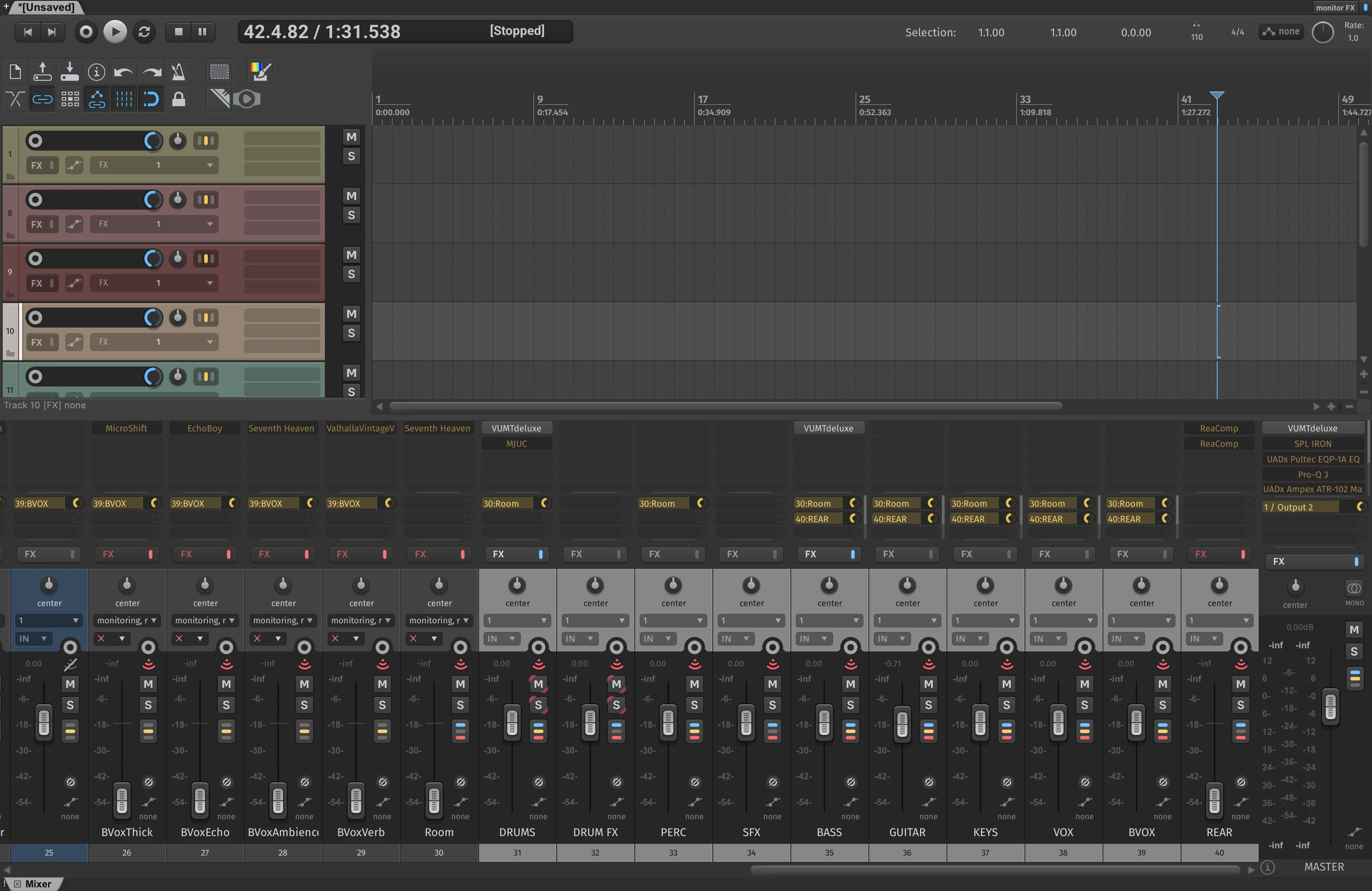
The template sets up nine buss tracks for drums, drum effects, percussion, sound effects, bass, guitars, keyboards, main and backing vocals. I also have single empty audio tracks for each of these groups in my preferred colour scheme and I duplicate these to however many tracks I'll need for the project.
I have a simple master buss set up, with an SPL Iron compressor, a Pultec style EQ and a tape emulator. I sometimes add to this but I prefer to keep my default master buss simple.
Each group have a few effects sends. I don't always end up using all of these but I often do. Drum tracks have some parallel drive or distortion sends, as well as a few reverb sends and a crush track. Guitars have separate left and right echo sends for stereo widening, as well as reverbs and a subtle shimmer. Vocals have parallel compression, thickening (love that SoundToys Microshift), delay, echo and reverb tracks.
I also have a main reverb send that I use if I want to place all instruments in a room together for some subtle cohesion.
Last, but not least - I'm completely hooked on the Andrew Scheps Rear Buss technique, I find it adds a lot of weight and fullness to my mix that I'm not able to achieve without, so I naturally have this set up in my mix template too.
Reaper productivity tips 2/3
Feb 26, 2025
This is the second of three posts sharing some of my productivity tips for the Reaper DAW. Check out the first.
4 - A shortcut for finding and opening plugins
I find Reaper is at its best when you get into using shortcuts. The powerful action system helps to make keyboard shortcuts in Reaper immensely useful. See tip #5 for another example of this.
A couple of the shortcuts I use the most revolve around managing plugins on tracks, as I mentioned in tip #2. Here's a couple more:
I've set up Shift+F as a shortcut for the action View: Show FX browser window. This way, I can quickly add a plugin to the active track using only the keyboard: Shift+F brings up the plugin search, I type in part of the name and hit return to insert the effect.
I also use ⌘+1 through to ⌘+9 for the action Track: Open/close UI for FX #1 on last touched track so that I can quickly open a specific plugin in the chain on the active track to make adjustments.
5 - Keyboard zoom
Rather than zooming with the mousewheel, try setting up keyboard shortcuts for horizontal and vertical zoom. I have w and e set up for horizontal zoom out and in respectively. And Shift+W/Shift+E for vertical zoom. That way, I can have one hand on the keyboard in a natural position while using the mouse with my other hand.
6 - Use macros and custom actions
The action system in Reaper is made all the more powerful using the macro or custom action feature. If you find yourself doing something frequently that requires a couple or more steps, see if you can't speed up your workflow by creating a custom action chaining those actions. Here are two of my most used custom actions.
I often group tracks into folders, most often if I have a guitar recorded with multiple microphones. I usually want the tracks inside the folder to only send to their parent track so that I can treat the multi-miked recording as a single sound. I've set up a quick action for this that I've called Send only to Parent (folder track) and mapped to Cmd+Shift+Control+G. This custom action runs these commands:
SWS/S&M: Remove sends from selected tracks
SWS: Enable master/parent send on selected track(s)
Those actions require the SWS/S&M Extension.
Another custom action that I use a lot is called Reduce breaths. Depending on the vocal style, I sometimes want to mostly remove or heavily reduce breaths in between singing on a vocal track. This custom action contains the following:
Item: Split items at time selection or razor edit
Xenakios/SWS: Nudge item volume down
Xenakios/SWS: Nudge item volume down
Xenakios/SWS: Nudge item volume down
Xenakios/SWS: Nudge item volume down
Xenakios/SWS: Nudge item volume down
Xenakios/SWS: Nudge item volume down
The Nudge item volume down action works 1dB at a time, so this action will be more or less aggressive depending on how many of those actions you insert. I have this mapped to Control+R, so when I Control-drag across an item to create a razor edit area in between singing I can hit Control+R to quickly reduce the volume inside that area.
Up Against the Wall
Dec 27, 2024
It's proud uncle day. My nephew plays the bass in indie band Panavision, and they released their first single today. Sounds great!
Ghostty
Dec 27, 2024
The new terminal emulator Ghostty is out. My impression so far? Delighful ascii animation on the home page, gloriously crisp font rendering and impressive speed.
Yann Tiersen - Kerlann (Live at Kerber Church)
Dec 25, 2024
I've not kept well enough up with Yann Tiersen to know that he was into synthesizers, and I love this live version of his tune Kerlann performed on the Buchla. The melody of the original is performed on a piano but there's something about the organic and woody sound of the Buchla that I find touching.
52 things to learn
Dec 24, 2024
This year, like the last, I was looking forward to synth maker Tom Whitwell's list of 52 things I learned in 2024.
Many interesting rabbit holes here but this one was particularily fascinating to me:
If you run one specific, but illegal, database query on a set of widely used health data, you can access Tony Blair’s entire personal medical history. Ben Goldacre
The linked part of the lecture is well worth watching, an interesting look on the dangers of pseudonymisation - replacing your actual name and address in a data set with a code name.
Reaper productivity tips 1/3
Sep 29, 2024
In my day job as a developer, I tend to invest some time in customizing my tools and exploring new tools and methods. It inspires me to discover new ways of doing things or new angles from which to look at my work, so it's only natural that I would do the same when it comes to my audio mixing.
This is the first of three posts exploring some perhaps less obvious productivity tips for the Reaper DAW. Let's jump in!
1 - Save good default presets for plugins
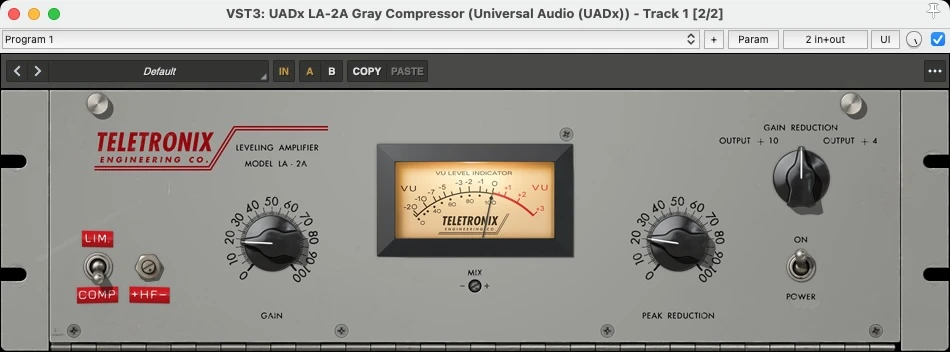
On some plugins, the default preset has a volume bump. This fools you into thinking it sounds better just by inserting the plugin. When I discover this, I usually save a new default preset without this volume increase, so I am able to start from a more neutral point of view. If the plugin doesn't enable you to save a new default plugin, Reaper has you covered: use the plus sign in the toolbar.
2 - Add keyboard shortcuts for inserting specific plugins
If you have a selection of plugins you use more than others, it might be helpful to add keyboard shortcuts for these. Reaper enables you to right click the plugin in the Add FX dialog and selecting Create shortcut....
In my setup, I use ⌥+⌘+1 for the Pro-Q 3 equalizer for instance, and ⌥+⌘+2 for the UAD API Vision Console.
3 - Keyboard access to the actions and main menu
I find keyboard shortcuts helpful for speeding up my interaction with applications, but it is sometimes a lot of muscle memory to practice and I find I have an upper limit for how many shortcuts are useful. The less often I use a shortcut, the more likely I am to forget it between each time I have use for it.
Reaper has a great feature called Actions that I find useful for these situations. By pressing ? you can search for actions and execute them without leaving your keyboard. This is a great way to discover new features and to quickly access features you don't use often enough to remember the shortcut for.
In addition, I use Raycast on my Mac to search for actions in the Reaper main menu. Raycast has a function called Search Menu Items. I've added a global shortcut of ⌘+Slash for this. An example of how I use this is selecting a track in Reaper and searching for the menu item Render tracks to mono stem tracks (and mute originals), a function I use just seldom enough to not warrant a specific keyboard shortcut.